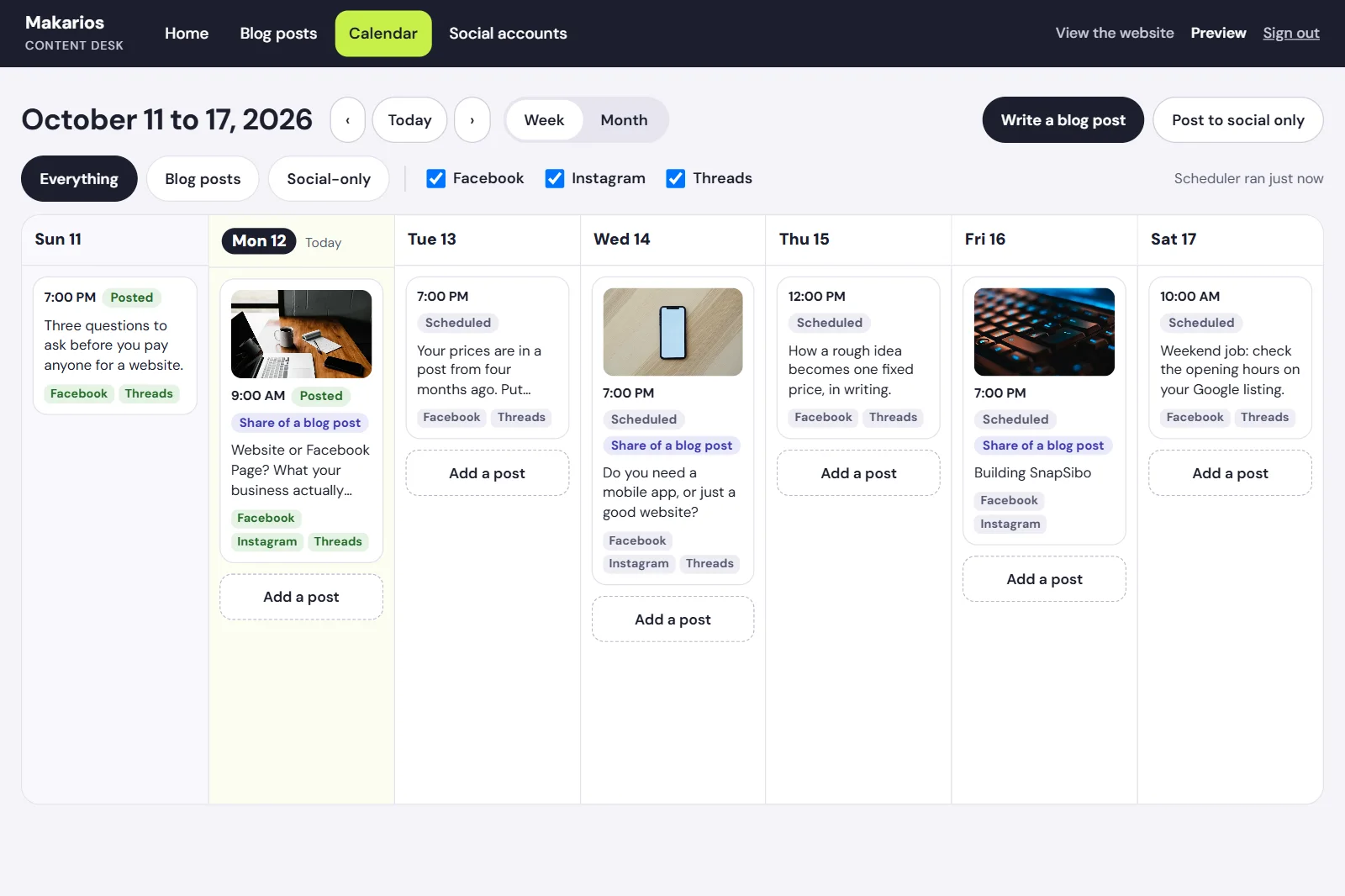
Sharing an article used to go like this. Publish it, open Facebook, paste the link, write a caption. Open Instagram, find a picture, write the caption again because links don't work there. Open Threads, cut it down to fit. Or, more often, forget Threads.
It is ten minutes of work, which is exactly why it never gets done properly. So we built one screen that does all three. This is what it looks like, what it taught us, and whether you should want one.
First: you probably don't need this
Meta Business Suite is free, and it already schedules posts to Facebook and Instagram from one place. If those two are where your customers are, use it and stop reading. Paid tools like Buffer cover more platforms for a monthly fee, and for most small businesses that fee is far less than the cost of building anything.
We say that to clients, so we should say it here.
Why we built ours anyway
Three reasons, and all three are about our own setup rather than a general rule:
- Our articles already live in our website's admin. The post, its picture and its summary are sitting right there. Copying them into another tool by hand is the step we wanted gone.
- We wanted Threads in the same place. It is the one we kept skipping.
- One sign-in. The person who writes the article should be able to share it without being handed the passwords to three social accounts.
What it does
You write the article and see, beside it, how Google will list it and how the page will look. When it is ready, you pick where it goes and when.
A calendar shows the week: what went out, what is waiting, and what failed. Posts that are not articles, like a quick tip or a photo from the week, go on the same calendar.
Then it does the dull parts on its own. It sends each post at its time, tells us when one goes out or fails, and refuses to post the same article to the same platform twice unless we ask it to.
What each platform taught us
The most useful thing we learned has nothing to do with code. The same caption does not work in three places.
- Facebook shows a line or two, then "See more". The first sentence has to earn the click on its own. The link turns into a preview card, so the caption can stay short.
- Instagram will not take a post without a picture, and a link in a caption is just text nobody can tap. So the picture matters most, the caption can run longer, and a few specific hashtags do more than thirty popular ones.
- Threads wants it short and conversational, closer to something you would say out loud. It takes one topic rather than a row of hashtags.
So the tool starts from one caption and lets us rewrite it for each platform before it goes.
What went wrong along the way
Nothing here was hard to write. Almost all of the lost time went to things outside our own code.
Facebook said our login "manages no Pages". It plainly did. The Page belongs to a business account rather than to a person, and Facebook answers that question differently for those. Slow to find, a few lines to fix.
Threads refused to connect at all. A new app can only be used by people who have accepted an invitation to test it, and the invitation sits quietly in a settings menu inside the Threads app. Nothing tells you it is there.
Our website cannot do anything on a timer. The site is a set of plain, fast pages, which is why it loads quickly and costs nothing to host. It is also why "post this at 7 PM" had nowhere to run. Scheduling became its own small piece that wakes up every fifteen minutes, checks what is due, and goes back to sleep.
None of those are in any tutorial's happy path. They are most of what a project like this is.
What it costs to run
Nothing extra. It runs on the same free hosting plan as the rest of the site, and at one post a day it uses a tiny fraction of the allowance.
The cost was the time to build it. That is the honest comparison: a small monthly fee for a ready-made tool, or days of work for one that fits exactly.
Should you build something like this?
Ask how often the copying happens and how many people do it.
One person posting twice a week should use Meta Business Suite. A team that repeats the same steps in several places every day, and keeps getting them slightly wrong, has a job a small custom tool will pay back.
That rule is not really about social media. It is the same one we use for spreadsheets, booking forms and everything else: the sign that you need software is a person doing a machine's job, daily.
If that sounds like somewhere in your business, tell us where things get slow. And if the answer is a free tool you already have, we'll say that too.